
Article Contents ::
- 1 Step By Step Tutorial How to Install Android 4.1 Jelly Bean Update on Galaxy S I9000 Cyanogenmod 10 (CM 10) Firmware
- 2 Cautions Before The Root, Format , Update, Soft or Hard Reset ::
- 3 Main Features of CyanogenMod 10 ROM
- 4 Warning! for Root Format & Reset
- 5 Install Android 4.1 Jelly Bean Update On Samsung Galaxy S I9000 Firmware Rom
Step By Step Tutorial How to Install Android 4.1 Jelly Bean Update on Galaxy S I9000 Cyanogenmod 10 (CM 10) Firmware
Cautions Before The Root, Format , Update, Soft or Hard Reset ::
- For Completing the Install Android 4.1 Jelly Bean Update On Samsung Galaxy S I9000 With CyanogenMod 10(CM 10) Process it took some time to complete so First charge your battery to 100% full,
- backup your important data if possible and in most cases take out SIM and SD card. Because your data cant be recovered from phone if once lost during the reset process.
- SuperGeek Suggest Backup from your Samsung Galaxy S I9000 For all of your data, a backup should be done on an external device, hard drive, raid system or media.
- Because It is impossible to recover your data from your Formatted Install Android 4.1 Jelly Bean Update On Samsung Galaxy Galaxy S I9000 With CyanogenMod 10(CM 10),after doing a Format or hard reset, so online backup is always important.
- So keep backup first

Step By Step Tutorial How to Install Android 4.1 Jelly Bean Update on Galaxy S I9000 Cyanogenmod 10 (CM 10) Firmware
- Cyanogen Mod 10 will give you maximum potential that you can enjoy a lot and able to see hidden settings
- By this CyanogenMod 10 Firmware Rom software you can install Android 4.1 Jelly Bean Update On Samsung Galaxy Galaxy S I9000
- Below you can see the phone status from which firmware and kernel it was running and how much ram will be going to be use in this ROM.
- In the previews version have some bugs which are solved in this version. (i.e Camera working in New ROM) and one more think is important that is this ROM can be installed only on rooted devices go to this article for how to root galaxy ace.
Main Features of CyanogenMod 10 ROM
- With this ROM you can enjoy new futures like boot,
- Cyanogen Mod settings (not all, it’s not fully merged by CyanogenMod team, not my fault),
- GSM (phone/messages/GPRS/EDGE/3G),
- Wi-Fi, Bluetooth, HW Acceleration (full), Sound, Headphones,
- GPS. All sensors like (proximity, rotation etc),
- Facebook sync, Buttons backlight,
- GMail fully works, Browser fully works, ICS keyboard Games.
- Market (now you can download all apps available for Gio with GB),
- Fixed animations (now it looks so good),
Warning! for Root Format & Reset
- It’s all your responsibility to Hard Reset or Format or Root or Unlock your Install Android 4.1 Jelly Bean Update On Samsung Galaxy S I9000 Firmware Rom phone we are not responsible for any kind of loss to you or your Mobile.
- By performing “Factory Reset“, all user data will be ERASED. You MUST took a proper backup PRIOR to running factory reset & Web update.
- If your Root Install Android 4.1 Jelly Bean Update On Samsung Galaxy Galaxy S I9000 Firmware Rom hard reset isn’t responding
Install Android 4.1 Jelly Bean Update On Samsung Galaxy S I9000 Firmware Rom
- Disable or remove the security suites such as antivirus or firewall from your Computer and LG device so that they won’t interrupt the procedure.
- Go through the path ‘Settings > Applications > Development > USB debugging’ and turn on to Enable USB Debugging option.
- disable the SIM Card Lock on your Galaxy S. For that you need to follow the path Settings > location and Security > Sim card lock and don’t check the tick mark the checkbox.
- device must be rooted and install clockworkmod recovery mode, Root Samsung Galaxy S I9000
- if your Galaxy S is running on Gingerbread or in some older ROM then you need to flash the new update and root .
- Step 1.
-
- Download below Android 4.1 Jelly Bean firmware Update firmware package and google apps package. Both files are in zip format. No need to extract them.
Rom file cm10_devil-V8.zip from here. file size is 142 Mb Addon file cm10_addons_devil-V8b.zip from here. size will be 94 MB Note: Above current version is 8, still they working to get stable JB rom . You come here daily check latest updates of rom files.
- Step 2. Now connect the smartphone to your computer and then move the above firmware zip on the phone’s SDcard.
- Now disconnect the device from the PC and then proceed and power off the phone.
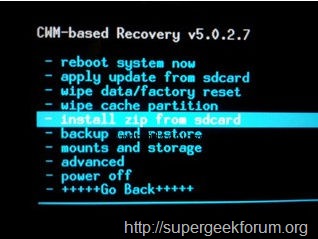
- Step 3 Enter into recovery mode when the phone is OFF by pressing and holding the (Volume Up + Home + Power button) together. In case it boots into normal mode, then you should repeat the action.
Note please follow this. Once you entered into Clockworkmod recovery you must do both wipe data/factory reset and wipe cache partition before installing the firmware zip file from the SD card.
Step By Step Tutorial How to Install Android 4.1 Jelly Bean Update on Galaxy S I9000 Cyanogenmod 10 (CM 10) Firmware
- Step 4 When Clockmod Recovery shows it main screen you need to select the option that says ‘install zip from sdcard’ and then ‘choose zip from sdcard’. Select the zip file cm10_devil-V8.zip you’ve moved at step 2 and then confirm the installation of the new firmware files.
- Step 5 When you flash the rom file. Again, go back to main menu recovery mode. Select “install zip from SD card”, choose Addon file cm10_addons_devil-V8b.zip file this time
- Now go to advanced and select the fix permissions option. That’s it if you done above steps correctly then proceed for further step.
- When the update is complete you need to get back to the main recovery menu and select ‘reboot system now’.
- Please note that your phone will perform its first boot this might take a while before loading all the apps and the Android 4.1 Jelly Bean home screen.
- However, in case the first boot take too long to load it means that something went wrong and you will need to
- To get more ram >>>> how-to-get-more-ram-on-galaxy-s-cm10-jelly-bean-cm9-ics-rom
That’s all now the format,root, unlock, Install Android 4.1 Jelly Bean Update On Samsung Galaxy S I9000 With CyanogenMod 10 Firmware hard reset Code device is formatted perfectly without any problems. In case if you find any issues with above procedure comment here. SuperGeekForum will try to solve your problem