
Article Contents ::
Step By Step Tutorial How to Unlock Bootloader of Sony Ericsson Xperia Phones
Cautions Before The Format Root Soft or Hard Reset ::
- For Completing the Format Root Sony Ericsson Xperia Unlock Bootloader CWM Recovery soft reset or hard reset Code Process it took some time to complete so First charge your battery to 100% full,
- backup your important data if possible and in most cases take out SIM and SD card. Because your data cant be recovered from phone if once lost during the reset process.
- SuperGeek Suggest Backup from your Root Sony Ericsson Xperia Unlock Bootloader CWM Recovery For all of your data, a backup should be done on an external device, hard drive, raid system or media.
- Because It is impossible to recover your data from your Formatted Root Sony Ericsson Xperia Unlock Bootloader CWM Recovery soft reset ,after doing a Format or hard reset, so online backup is always important.
- So keep backup first
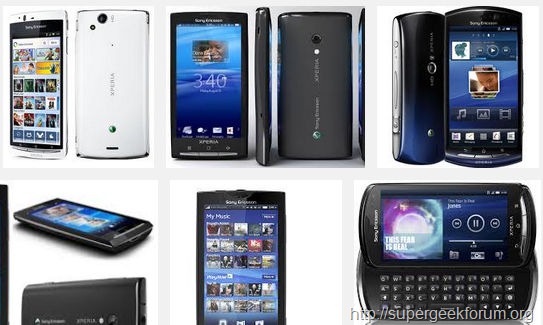
Step By Step Tutorial How to Unlock Bootloader of Sony Ericsson Xperia Phones
Warning! for Format & Reset
- It’s all your responsibility to Hard Reset or Format or Root or Unlock your How to Root Sony Ericsson Xperia Unlock Bootloader CWM Recovery phone we are not responsible for any kind of loss to you or your Mobile.
- By performing “Factory Reset“, all user data will be ERASED. You MUST took a proper backup PRIOR to running factory reset & Web update.
- If your Format How to Root HTC Desire C Unlock Bootloader CWM Recovery hard reset isn’t responding
How to Unlock Bootloader of Sony Ericsson Xperia Phones
- 1. First you must have unlocking bootloader key.
- In order to get the key you need visit the Ericsson website click Go to unlocking-boot-loaderhere to go.
- After opening the webpage scroll down to the bottom and click on ‘Start unlocking the boot loader’.
- In the next also do same thing scroll to bottom of the page and click ‘Continue’. according to instructions .
- Accept all the Legal terms by clicking on the boxes and then click on ‘I accept’.
- Under Create Unlock request, you need to enter the information such as Name, IMEI numberand E-mail. (For getting the IEMI number dial *#06# in the phone). After entering all details then, click the ‘Submit’ button.
- Then, somewhere on the next page, you will find boot loader unlock key. Copy that key on your notepad and save it to a known location in your Computer.
- Download the Sony Xperia device USB drivers for both windows 7 32-bit and 64-bit from here .
- After downloading the file extract it and don’t do anything.
- Again download the fastboot with android usb file package from here.
- Extract the zip file at somewhere else in your PC.
- Now Open the folder HOLD shift key in the keyboard and right click with mouse on the fastboot folder. Within a second, the list will pop up where you need to select ‘Open command window here’.
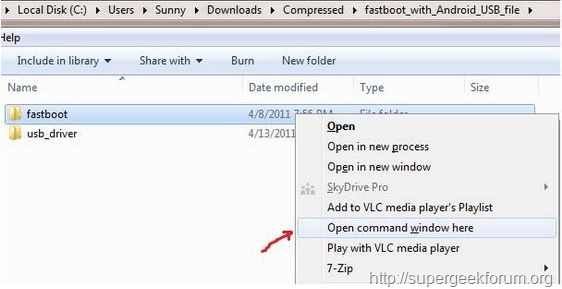
Step By Step Tutorial How to Unlock Bootloader of Sony Ericsson Xperia Phones
- Step 2:
- Now switch off the device and connect your device to PC with USB cable by holding some important button in the device. It may varies from device to devices. check out below things then you will get an idea.
For Xperia arc, arc S, neo, neo V, pro you need to hold Menu button. For Xperia PLAY hold Search Button. For Xperia mini, mini pro, ray, active, Live with Walkman, Xperia S hold volume up button.
- in the command window, type the command without inverted commas ” fastboot.exe -i 0x0fce getvar version “. If it shows some kind of value in result then your device has been connected successfully.

Step By Step Tutorial How to Unlock Bootloader of Sony Ericsson Xperia Phones
- Once again, type this command without inverted commas ” fastboot.exe -i 0x0fce oem unlock 0xKEY “(in this command you need to replace the word “key” with the “unique key”, which you have noted down in step 1).
- successfully unlocked your device’s Bootloader
For confirm if device is rooted or not. just go to Google Play store download root checker app and verify the root access. That’s all now the format,root,Bootloader unlock, All Sony Ericsson Xperia hard reset Code device is formatted perfectly without any problems. In case if you find any issues with above procedure comment here. SuperGeekForum will try to solve your problem.