
Article Contents ::
Step By Step Tutorial How to Install Android 4.0.4 ICS Update On Sony Xperia Ray ST18A/I Firmware
Cautions Before The Root, Format , Soft or Hard Reset ::
- For Completing the Install Android 4.0.4 ICS Update On Sony Xperia Ray ST18A/I Process it took some time to complete so First charge your battery to 100% full,
- backup your important data if possible and in most cases take out SIM and SD card. Because your data cant be recovered from phone if once lost during the reset process.
- SuperGeek Suggest Backup from your Sony Xperia Ray ST18A/I For all of your data, a backup should be done on an external device, hard drive, raid system or media.
- Because It is impossible to recover your data from your Formatted Install Android 4.0.4 ICS Update On Sony Xperia Ray ST18A/I With ,after doing a Format or hard reset, so online backup is always important.
- So keep backup first

Step By Step Tutorial How to Install Android 4.0.4 ICS Update On Sony Xperia Ray ST18A/I Firmware
Warning! for Root Update Format & Reset
- It’s all your responsibility to Hard Reset or Format or Root or Unlock your Install Android 4.0.4 ICS Update Sony Xperia Ray ST18A/I With Firmware Rom phone we are not responsible for any kind of loss to you or your Mobile.
- By performing “Factory Reset“, all user data will be ERASED. You MUST took a proper backup PRIOR to running factory reset & Web update.
- If your Root Install Android 4.0.4 ICS Update Update Sony Xperia Ray ST18A/I Firmware hard reset isn’t responding
Install Android 4.0.4 ICS Update On Sony Xperia Ray ST18A/I Firmware Rom
- Sony has released Official Final release of Android 4.0 ICS firmware for few of their devices Xperia Ray ST18A/I
- Disable or remove the security suites such as antivirus or firewall from your Computer and LG device so that they won’t interrupt the procedure.
- Enable USB debugging in your Sony Xperia Ray ST18A/I from the path “Settings > Applications >Development > USB debugging”
- Step 1.
-
- Download Flashtool for flashing the software on all sony devices. Get it from Here to your PC. The size of the file was 129 MB.
- Now download Android 4.0.4 ICS firmware zip package file for Sony Xperia Ray ST18a/I fromHere to your PC.
- (file name ST18i_4.1.B.0.431_tw will be 197 MB).
- No root is required, No bootloader and unlock is required and it will not void warranty too.
- Download the above any one of them Android ICS firmware package FTF zipped file into your PC. Extract the zip file by using by either using 7zip or winrar software. After extracting, you will get the get ST18i_4.1.B.0.431_tw.ftf file size will be like 345 MB.
- Copy the downloaded ST18i_4.1.B.0.431_tw.ftf file into C:/flashtool/firmware. Before copying the FTF file, delete all existing files in the firmware folder. Make sure that only our current FTF packagewill be in the firmware folder.
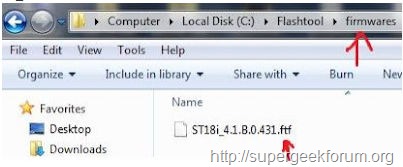
Step By Step Tutorial How to Install Android 4.0.4 ICS Update On Sony Xperia Ray ST18A/I Firmware
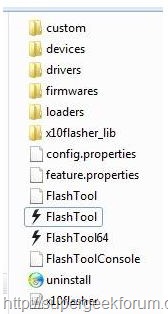
- Install the flashtool application on the PC. In C drive you can see flashtool folder. Open the folder then you will get fives sub folders like this Custom, Drivers, Firmwares, Loaders and X10Flasher_lib.

Step By Step Tutorial How to Install Android 4.0.4 ICS Update On Sony Xperia Ray ST18A/I Firmware
- Now you can see the 4.1.B.0.431 firmware version of your Xperia Ray ST18i device which we are going to flash it.
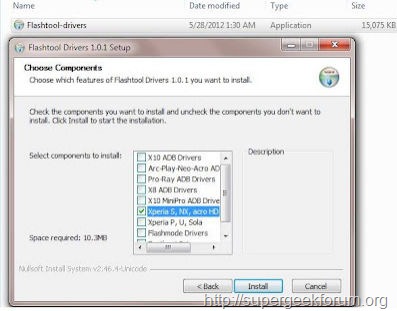
Step By Step Tutorial How to Install Android 4.0.4 ICS Update On Sony Xperia Ray ST18A/I Firmware
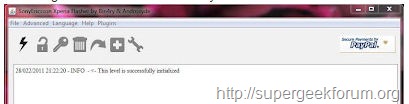
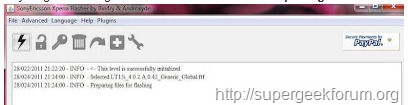
- Go to flashtool folder and Run the flashtool.exe application. A small window will be displayed on the screen with a message “This level is successfully initialized”
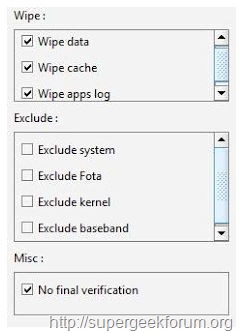
- On right side of the window you need to select these options wipe data, wipe cache, wipe apps log and No final verification.
- Click on left side top flash thunderbolt icon. A little window will be get, which shows two options flashmode and fastboot mode. Select flashmode and click ok to proceed the next step.
- Select the “ST18i_4.1.B.0.431_tw.ftf” firmware package at left side column.
- Click OK. Then you get message in flashtool window like “Preparing files for flashing”.
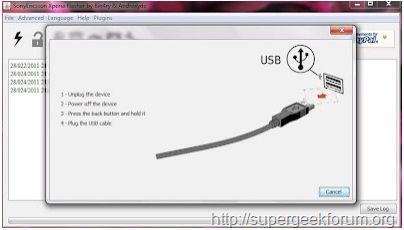
- 7. After the installation has completed, disconnect your phone from the PC and reboot it.
That’s all now the format,root, unlock, Updated Sony Finally Android 4.0.4 ICS will be installed in your Sony Xperia Ray ST18A/I Firmware hard reset Code device is formatted perfectly without any problems. In case if you find any issues with above procedure comment here. SuperGeekForum will try to solve your problem.