
Article Contents ::
Step By Step Tutorial How to Update Galaxy S2 I9100 Official ICS 4.0.4 XWLPM Firmware
Cautions Before The Format Root Soft or Hard Reset ::
- For Completing the Update Galaxy S2 I9100 Official ICS 4.0.4 soft reset or hard reset Code Process it took some time to complete so First charge your battery to 100% full,
- backup your important data if possible and in most cases take out SIM and SD card. Because your data cant be recovered from phone if once lost during the reset process.
- SuperGeek Suggest Backup from your Root Update Galaxy S2 I9100 Official ICS 4.0.4 For all of your data, a backup should be done on an external device, hard drive, raid system or media.
- Because It is impossible to recover your data from your Formatted Update Galaxy S2 I9100 Official ICS 4.0.4 ,after doing a Format or hard reset, so online backup is always important.
- So keep backup first

Step By Step Tutorial How to Update Galaxy S2 I9100 Official ICS 4.0.4 XWLPM Firmware
- It’s all your responsibility to Hard Reset or Format or Root or Unlock your How to Root Galaxy Tab 10.1 Wi-Fi P7510 phone we are not responsible for any kind of loss to you or your Mobile.
- By performing “Factory Reset“, all user data will be ERASED. You MUST took a proper backup PRIOR to running factory reset & Web update.
- If your Format How to Root Update Galaxy S2 I9100 hard reset isn’t responding
How to Format Update Galaxy S2 I9100 Mobiles
- Disable or remove the security suites such as antivirus or firewall from your Computer and LG device so that they won’t interrupt the procedure.
- Go through the path ‘Settings > Applications > Development > USB debugging’ and turn on to Enable USB Debugging option.
- Download USB drivers for all Samsung Galaxy Devices from 32-bit here and 64-bit here.
Steps and Procedure to Update Galaxy S2 I9100 :
- Download the XWLPM Firmware zip package file from here to your PC.
- The file name is I9100XWLPM_I9100OXELP8_SER.zip and size will be 510 MB.
- Extract it by using either winzip or winrar. Once extracted the file,
- you will get file with name like this I9100XWLPM_I9100OXELP8_I9100XXLQ6_HOME.tar.md5.
- Download Odin3-v 1.85 flash tool from here to your PC. Extract the Odin package then you get odin3-v 1.85.exe inside the folder.
step 2:;
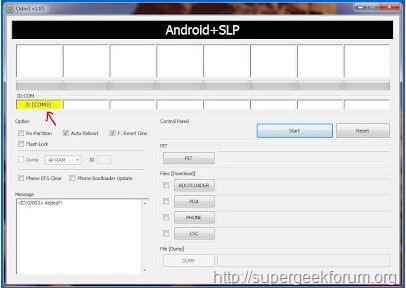
- Double click to launch the odin3-v 1.85.exe application on your Computer.
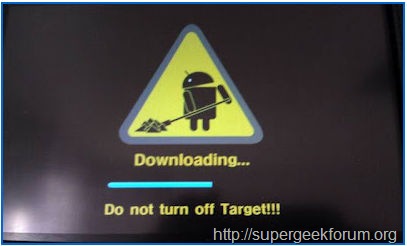
- It’s’time to switch off your Tab to enter into download mode by pressing and holding Volume Down + Home + Power buttons simultaneously till you see a warning message on your screen. Then, press the Volume up button to get into download mode.
Step By Step Tutorial How to Update Galaxy S2 I9100 Official ICS 4.0.4 XWLPM Firmware
Step By Step Tutorial How to Update Galaxy S2 I9100 Official ICS 4.0.4 XWLPM Firmware
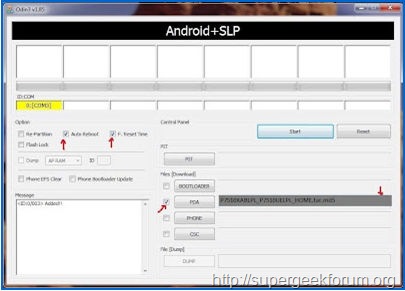
- 7. Now click on ‘PDA’ and select the I9100XWLPM_I9100OXELP8_I9100XXLQ6_HOME.tar.md5 file which you have got from the extracted folder in step 2.
Step By Step Tutorial How to Update Galaxy S2 I9100 Official ICS 4.0.4 XWLPM Firmware
- 8. After selecting the file, click on ‘Start’ button in Odin to start flashing the firmware update.
-
- It take around 6-7 minutes to complete the update.
- 9. after complete the device will reboot automatically and you will see a green color Pass message in Odin. now just disconnect your device from the Computer.
- 10. Reboot your device in recovery mode by pressing and holding press and hold :: Home + Volume Up + Power keys together. In recovery mode, you need to select ‘wipe data / factory reset’ and then ‘wipe cache partition’ to clear cache from your device.
-
Note: If your Any error comes like reboot etc, then remove the battery and reinstall the same. 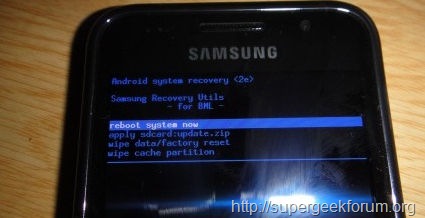
- 11. Select Go Back to menue ‘reboot system now’ option to restart your Galaxy S2 I9100 Official ICS 4.0.4 . After restarting the device, no longer you will face any loop problem.
- Note: If your Odin hangs in any step or it display the FAIL message then you need to unplug your device from the Computer and take out the battery and place it back to its previous position, close the Odin and repeat the process again from step 2
That’s all now the format,root, unlock, Update Galaxy S2 I9100 Official ICS 4.0.4 XWLPM Firmware hard reset Code device is formatted perfectly without any problems. In case if you find any issues with above procedure comment here. SuperGeekForum will try to solve your problem