
How to Make Usb Bootable With the CMD step by step Guide to Bootable Pen drive
What are the uses of Bootable Usb or Pen drive —
Bootable Usb or Pen drive can be used for booting your system for installing windows to your system, booting system with Bootable Usb or Pendrive has its own benefits like system boots faster than disk drive, and this is easy to install os like windows vista or windows 7 with Bootable Usb or Pendrive ,
How to Make Usb Bootable With the CMD step by step Guide to Bootable Pen drive
- initially when i first get to know about installing windows with my own , I tried many ways to install windows setup to my desktop and my laptop,
- Virus is one of the most common problem for corrupt the system files, and after virus attack your system you have to re install the windows setup for better performance, and installing windows with disk drive dvd drive is took much time but with Bootable Usb or Pendrive windows installation is quite simple and speedy, it save your valuable time,
Now Step By Step tutorial for Bootable Usb or Pen drive —
Step 1 —
- put your pendrive or usb drive to usb port,
- now start your command prompt by typing cmd in run and hit enter,
- Make sure that you have Administrative account for this all process of Bootable Usb or Pendrive,
- now type — DISKPART and hit Enter, you will see like in image below,

Step 2 —
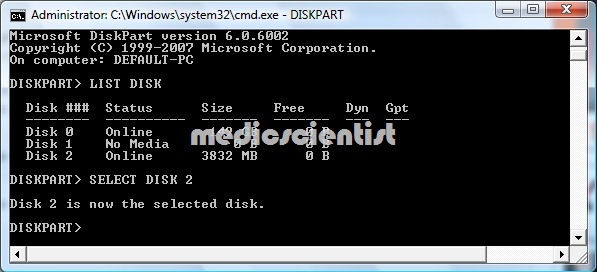
- Now Type – LIST DISK
- this command will show you all disk available in your system,
Step 3 —
- Now type SELECT DISK 2
- as shown in above image ,
- I choose disk 2 but you may have different no of disks and their size are also different, my usb disk id 4GB , so i know that this disk 2 is my usb drive,
- choose write disk because if you select wrong disk then in next step we will format them and it will erase all data from your disk.
Step 4 —
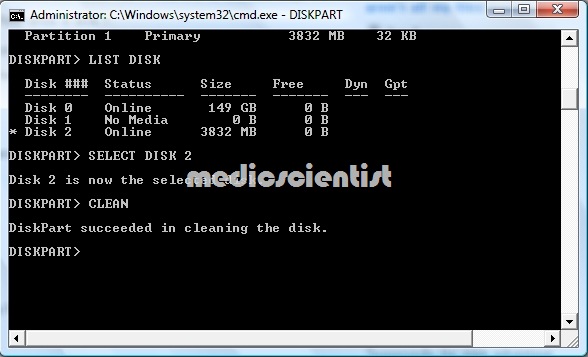
- Now we have to clean the disk , this cleaning process will erase all sector from your disk,
- just type CLEAN , as shown in image given below,
- now your disk is clean for creating fresh partition,
Step 5 —
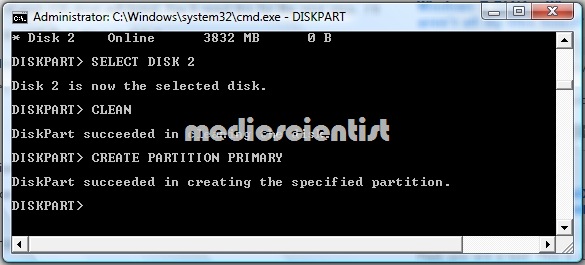
- after cleaning the disk now we have to create a new Primary partition in your disk,
- for creating Primary partition just type CREATE PARTITION PRIMARY ,
- Now you have created primary partition in your usb disk,
Step 6 —
- Now we have to select this partition and for formating for that
- first type LIST PARTITION ,it will show all partition in your disk we have just create one partition so here is only one partition,

- Now select the partition by type SELECT PARTITION 1

Step 7 —
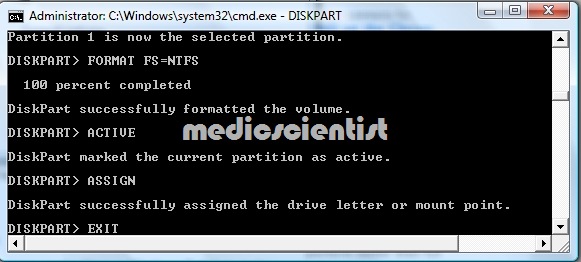
- Now we will format the partition by command for formatting and we use NTFS,
- Just type FORMAT FS=NTFS ,
- DISK will start formatting it will take some time,

Step 8 —
- This is the most important step because now we will activate the partition for booting,
- just type ACTIVE ,
- Now just type EXIT and you will out of the DISKPART ,
- You almost done everything for creating Bootable Usb or Pendrive,
Step 9 —
- Now your usb disk is ready for booting, it is booting ready,
- Bootable Usb or Pendrive is ready to boot any windows vista or windows 7,
Step 10 – Creating Bootable VISTA OR WINDOWS 7
- Now just put your windows vista or windows 7 disk in disk drive and copy all files from disk to your Bootable Usb or Pendrive and your Bootable Usb or Pendrive for VISTA AND WINDOWS 7 is ready to Boot,
- this will works fin with windows vista and windows 7 , Perfectly.
Note — in any case
- Make sure that your windows vista and windows 7 have all essential file for Booting,
- Spatially folder name ( boot and efi )
Note —
- Make sure to set your BIOS to boot priority will be USB or REMOVABLE DISK,
- it may be different in different systems,
All done well now enjoy the Bootable Usb or Pendrive for Booting Windows Vista and Windows 7 .