
Article Contents ::
- 1 How to make Bootable Windows XP PenDrive Bootable XP USB in simple steps
- 2 Why we need Bootable Windows XP PenDrive
- 3 Here i will show you step by step guide to make Bootable Windows XP PenDrive —
- 4 Here is the process to make Bootable Pen Drive.
- 5 Second Method by WinSetupFromUSB_0-2-3
- 6 step 1- download winsetupformatusb >>>download from >>>> WinSetupFromUSB-Download
- 7 winsetupformatusb
- 8 Step 2–
- 9 Step 3-
How to make Bootable Windows XP PenDrive Bootable XP USB in simple steps
Why we need Bootable Windows XP PenDrive
- there are many reasons for making this Bootable Windows XP PenDrive , lile if our cd drive is not working and our windows is corrupt then how to format the computer and how to install new windows xp,
How to make Bootable Windows XP PenDrive Bootable XP USB in simple steps
- and the other one reason is that if you wants to install it to your clients and any other persons system then if we use cd then it took so linh time but by using this Bootable Windows XP PenDrive Bootable XP USB we save our maximum time ,
- and the final one that’s why i wants to create Bootable Windows XP PenDrive is that when i am trying to install windows to my friends system my disk of xpsp2 is not working fin ,may be due to some scratch on it, that;s why this Bootable Windows XP PenDrive is very useful for all kind of this works,
Here i will show you step by step guide to make Bootable Windows XP PenDrive —
- as i already told you how to make your usb bootable by disk manager,
Windows XP Boot from USB is much faster than boot from CD Drive. You can easily install Windows XP from a Pen drive by making your Bootable XP USB OR Pen Drive Bootable.
Here is the process to make Bootable Pen Drive.
- By this make Bootable Windows XP PenDrive Bootable XP USB, you can install windows from pen drive directly ,
- windows XP installation from USB in simple steps by making bootable xp usb,
Step 1 —
- First Download this USBMultiboot10.zip >>>>> download USB_MultiBoot_10
You must do All steps as shown below carefully
- now just Unzip the file after downloading
- A folder will be created named “USB-Multiboot_10”
- Now insert your PenDrive with minimum 1 GB pen drive into USB port
Note :
- Make sure that you have complete Backup your data from Pen drive before making Bootable Windows XP PenDrive. Because your Pen Drive will be formatted during making bootable pen drive process.
Now follow this steps :
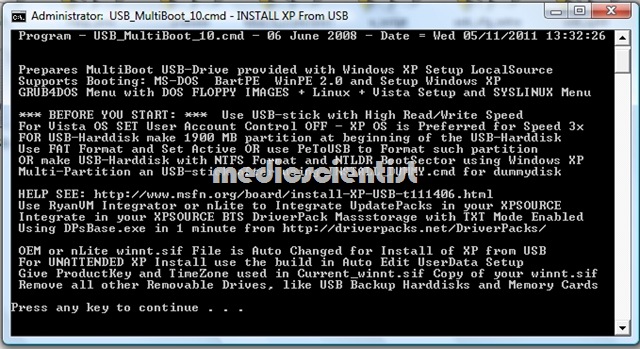
- Open USB_Multiboot_10.cmd from USB_multiboot_10 folder
- Press any key to Continue… A message will be appearing. Press ENTER
How to make Bootable Windows XP PenDrive Bootable XP USB in simple steps
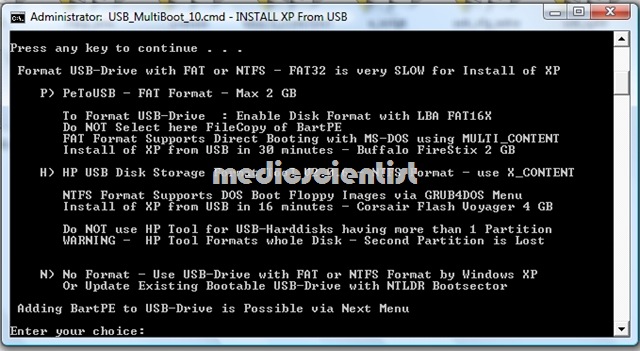
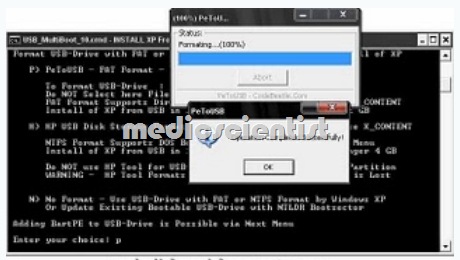
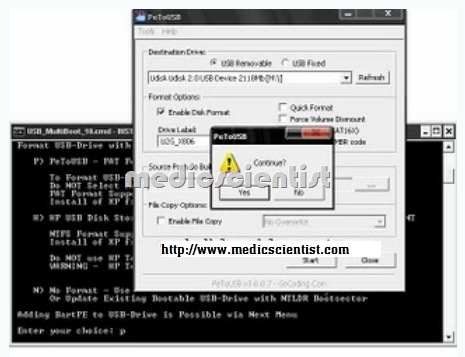
- Now just Enter your choice : type P and press ENTER Now Pen derive format option will come and format your pen drive. See below pictures…
How to make Bootable Windows XP PenDrive Bootable XP USB in simple steps

How to make Bootable Windows XP PenDrive Bootable XP USB in simple steps
How to make Bootable Windows XP PenDrive Bootable XP USB in simple steps
How to make Bootable Windows XP PenDrive Bootable XP USB in simple steps
Step 2 —
- Now insert your XP CD in your CD Rom or virtual drive any one works fine,
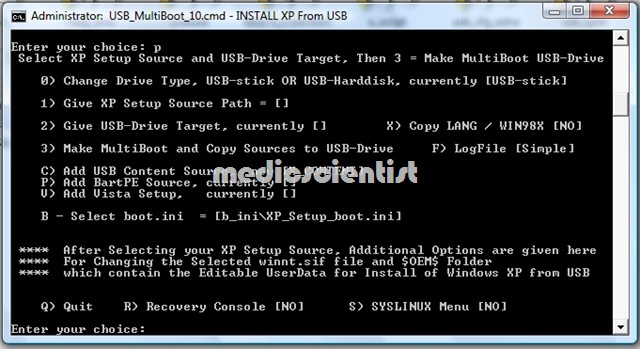
- as you can see the 0 1 2 3 options are in image below, if your pendrive is already bootable then you can skip step 1, ans directoly start from here step 2,
- in step 1, we make our pendrive bootable enabled ,
- Now Just Type 1 and press ENTER in Enter your choice just Locate the XP CD installation Disk Choose YES when unattended install option appear
How to make Bootable Windows XP PenDrive Bootable XP USB in simple steps
- Now insert the below information on by one and press OK
- Owner Name = Techscientist (Your Name)
- Organization Name = Techscientist (Your Name)
- Product Key = XXXXX-XXXXX-XXXXX-XXXXX-XXXXX (your XP serial Key), there is a demo key already present
- Computer Name = Techscientist (your computer name)
- Administrator Password = XXXX(Your password) any password you can choose if you don’t wants any password then just put * in box,
- Time Zone = Your time zone first three no as shown in image while installing,
- Workgroup Name = Techscientist (Your name)
- User Name = Techscientist (Your name)
- Now press OK
Step 3 —
- Type 2 and press ENTER in choice 2
- Now locate your pen drive location as you named it while formatting ,
- Now just Type 3 and press enter the files are starting copying from xp disk to your pendrive,
- Now the process will continue to make bootable XP Pen drive
- This process took some time so keep patience it took about 1 hr to complete may be less depending your system configuration,
- During this process it will prompt you to yes many time always click yes, and everything will be works great.
Note :
- During the installation process never disconnect the pen drive from USB port ,until the first time windows desktop appear contineue…
- then click any key and all done.
Note 2–
- In many computer during the installation process after restarting first time an error hall.dll will come, like hall.dll is missing or something, but don’t worry ,
- start the process again just skip step 1 formatting disk, just choose “2.and 3. Continue with GUI mode setup Windows XP + Start XP from HD 1” from boot menu option and press ENTER
Second Method by WinSetupFromUSB_0-2-3
step 1- download winsetupformatusb >>>download from >>>> WinSetupFromUSB-Download
- if the link is not working than try to search in google for ”
winsetupformatusb
- now just extract it to a folder
- and just follow the steps in the images
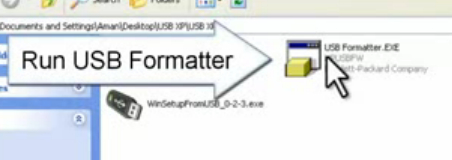
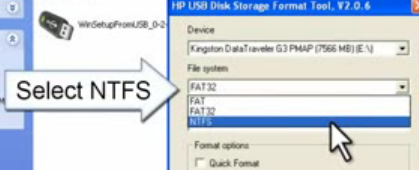
- run the usb formatter tool, to format your usb drive
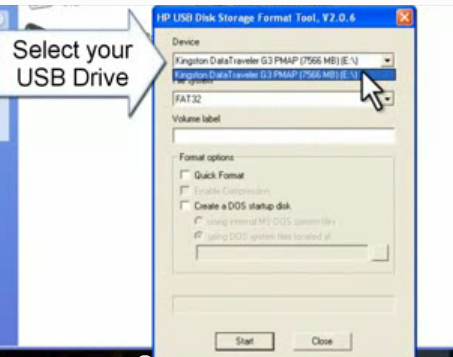
- select your usb drive
- select the NTFS option
- select quick format option for fast process
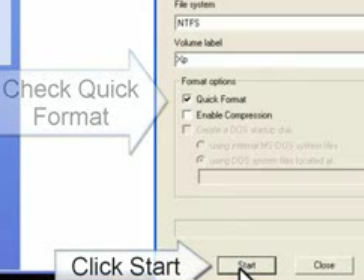
- now just start the process
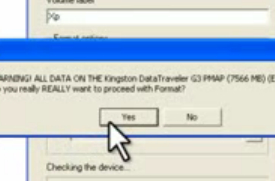
- accept the term and conditions
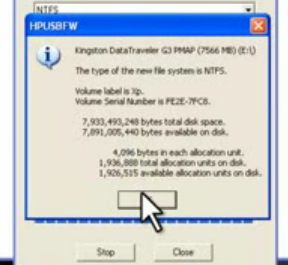
- click on ok

- now just close after the completion of the process.
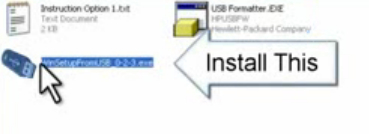
Step 2–
- install the win setup from usb
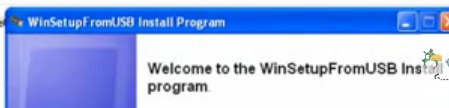
- after complete installation, run the program
- and select the destination of your XP files from cd or from folder .
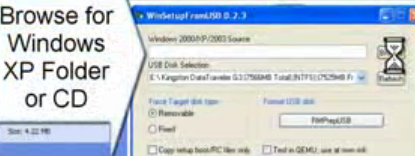
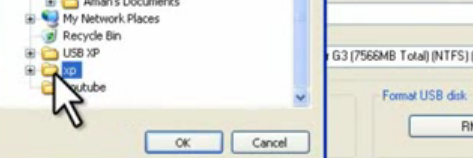
- now select your usb drive in usb section
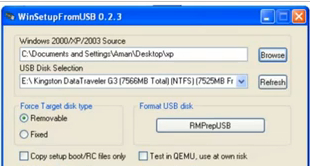
- now just leave every option as such and click the go button
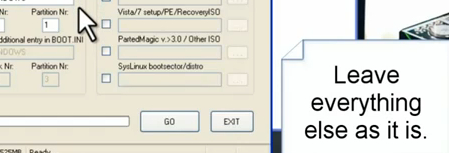
- just press the go button and wait for a while .
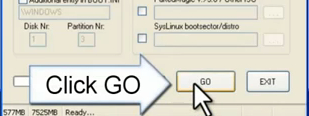
- now just after completion the process ur usb is ready to install xp
Step 3-
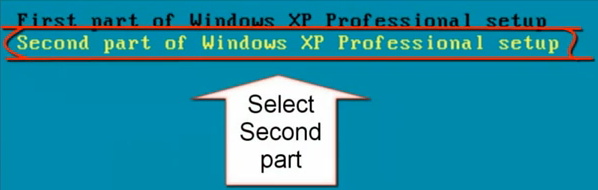
- first time when booting from usb select the first part and start
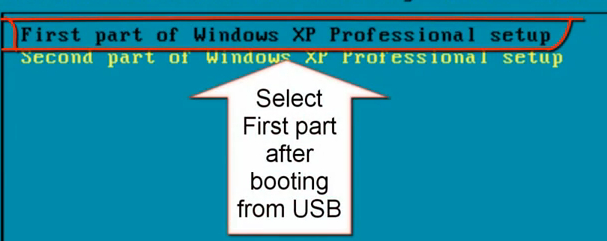
- after restarting select part 2, if it is not automatically selected

- select part 2
- and now install windows normally as from CD drive .

- This will work fine if u follow every step this is the easiest way to make the XP-Usb bootable